技术分享
未读Git 同步上游仓库的更新 使用一个 Github Template 创建了我自己的仓库,需要同步一下补丁更新,总不能自己手抄一遍吧,搜了一下解决方案。
记录一下。
添加上游仓库 给上游仓库取个名字,如果将命名为 upstream ,可以在本地仓库中运行以下命令:
1git remote add upstream https://github.com/$<upstream-repo>.git
获取上游仓库的更改 运行以下命令以获取上游仓库中的所有分支和提交:
1git fetch upstream
合并上游更改 现在,将上游 main 分支的更改合并到您的本地 main 分支:
1git merge upstream/main --allow-unrelated-histories
如果只需要合并特定的 commit :
1git cherry-pick <commit-hash>
也可以使用
1gcp <commit-hash>
commit-hash 可以直接从 github 网页上复制。
这时 commi ...
技术分享
未读
原文位置: https://markdown.com.cn/basic-syntax/paragraphs.html
Markdown 段落要创建段落,请使用空白行将一行或多行文本进行分隔。
Markdown语法
HTML
预览效果
I really like using Markdown.
<p>I really like using Markdown.</p>
I really like using Markdown.
I think I'll use it to format all of my documents from now on.
<p>I think I'll use it to format all of my documents from now on.</p>
I think I’ll use it to format all of my documents from now on.
段落(Paragraph)用法的最佳实践不要用空格(spaces)或制表符( tabs)缩进 ...
技术分享
未读
原文位置: https://markdown.com.cn/basic-syntax/headings.html
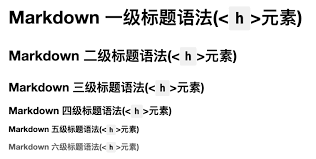
Markdown 标题语法要创建标题,请在单词或短语前面添加井号 (#) 。# 的数量代表了标题的级别。例如,添加三个 # 表示创建一个三级标题 (<h3>) (例如:### My Header)。
Markdown语法
HTML
预览效果
# Heading level 1
<h1>Heading level 1</h1>
Heading level 1
## Heading level 2
<h2>Heading level 1</h2>
Heading level 2
### Heading level 3
<h3>Heading level 1</h3>
Heading level 3
#### Heading level 4
<h4>Heading level 1</h4>
Heading ...

技术分享
未读
原文位置: https://markdown.com.cn/cheat-sheet.html#%E6%80%BB%E8%A7%88
总览Markdown 速查表提供了所有 Markdown语法元素的基本解释。如果你想了解某些语法元素的更多信息,请参阅更详细的基本语法 和 扩展语法.
基本语法这些是 John Gruber 的原始设计文档中列出的元素。所有 Markdown应用程序都支持这些元素。
元素
Markdown 语法
标题(Heading)
# H1 一级标题 ## H2 二级标题 ### H3 三级标题
粗体(Bold)
**bold text**
斜体(Italic)
*italicized text*
引用块(Blockquote)
> blockquote
有序列表(Ordered List)
1. First item 2. Second item 3. Third item
无序列表(Unordered List)
- First item - Second item - Third item
代码(Code)
`cod ...